14. 14. Dafny VSCode extension and the Dafny Language Server {#sec-dafny-language-server-vscode}#
14.1. 14.1. Dafny functionality within VSCode#
There is a language server for Dafny, which implements the Language Server Protocol. This server is used by the Dafny VSCode Extension; it currently offers the following features:
Quick syntax highlighting
As-you-type parsing, resolution and verification diagnostics
Support for Dafny plugins
Expanded explanations (in addition to the error message) for selected errors (and more being added), shown by hovering
Quick fixes for selected errors (and more being added)
Limited support for symbol completion
Limited support for code navigation
Counter-example display
Highlighting of ghost statements
Gutter highlights
A variety of Preference settings
Most of the Dafny functionality is simply there when editing a .dfy file with VSCode that has the Dafny extension installed. Some actions are available through added menu items. The Dafny functionality within VSCode can be found in these locations:
The preferences are under the menu Code->Preferences->Settings->Dafny extension configuration. There are two sections of settings.
A hover over an error location will bring up a hover popup, which will show expanded error information and any quick fix options that are available.
Within a .dfy editor, a right-click brings up a context menu, which has a menu item ‘Dafny’. Under it are actions to Build or Run a program, to turn on or off counterexample display, find definitions, and the like.
14.2. 14.2. Gutter highlights {#sec-gutter-highlights}#
Feedback on a program is show visually as underlining with squiggles within the text and as various markings in various colors in the gutter down the left side of an editor window.
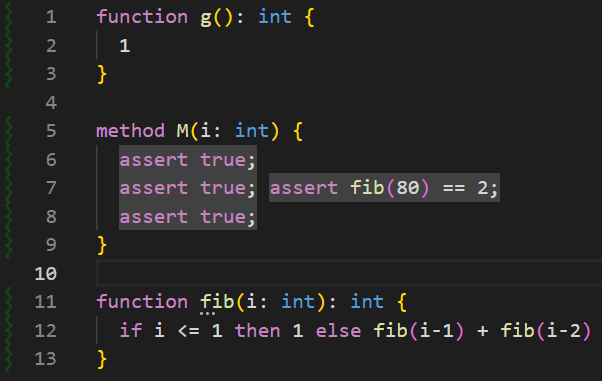
The first time a file is loaded, the gutter will highlight in a transparent squiggly green line all the methods that need to be verified, like this:
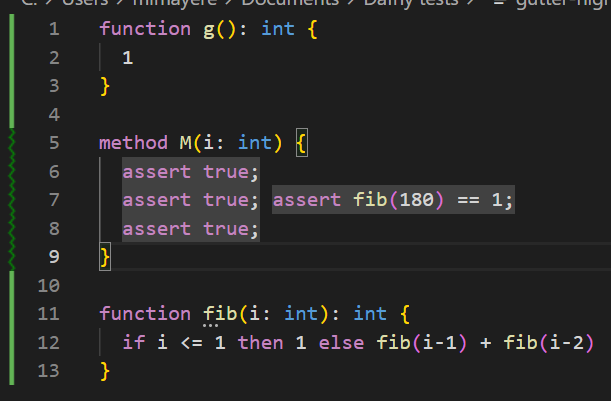
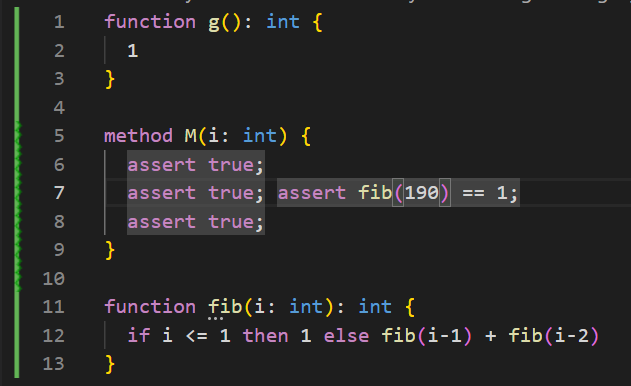
When the file is saved (in verification on save), or whenever the Dafny verifier is ready (in verification on change), it will start to verify methods. That line will turn into a thin green rectangle on methods that have been verified, and display an animated less transparent green squiggly line on methods that are being actively verified:
When the verification finishes, if a method, a function, a constant with default initialization or a subset type with a witness has some verification errors in it, the editor will display two yellow vertical rails indicating an error context.
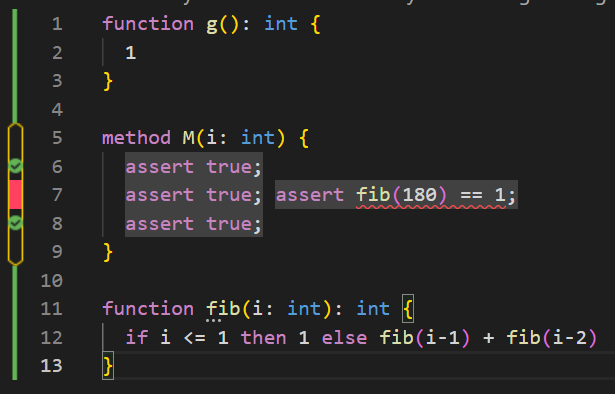
Inside this context, if there is a failing assertion on a line, it will fill the gap between the vertical yellow bars with a red rectangle, even if there might be other assertions that are verified on the line. If there is no error on a line, but there is at least one assertion that verified, it will display a green disk with a white checkmark on it, which can be used to check progress in a proof search.
As soon as a line is changed, the gutter icons turn transparent and squiggly, to indicate their obsolescence.
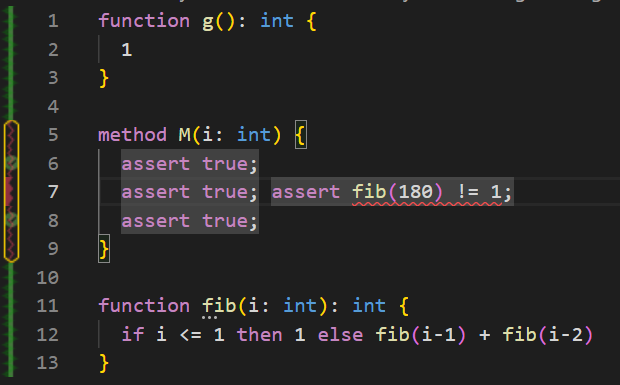
The red error rectangles occupy only half the horizontal space, to visualise their possible obsolescence.
When the file is saved (in verification on save), or as soon as possible otherwise, these squiggly icons will be animated while the Dafny verifier inspect the area.
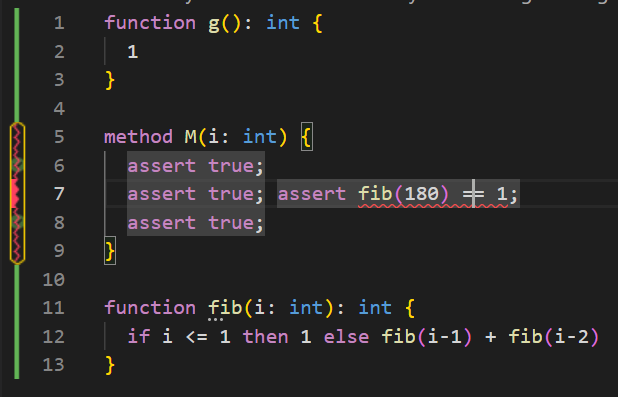
If the method was verifying before a change, instead of two yellow vertical bars with a red squiggly line, the gutter icons display an animated squiggly but more firm green line, thereby indicating that the method used to verify, but Dafny is still re-verifying it.
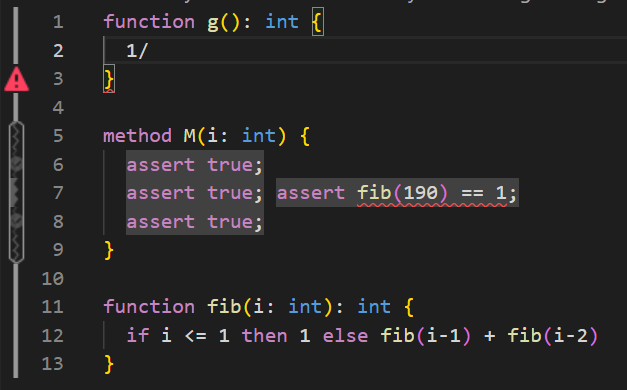
If there is a parse or resolution error, the previous gutter icons turn gray and a red triangle indicates the position of the parse or resolution error.
14.3. 14.3. The Dafny Server {#sec-old-dafny-server}#
Before Dafny implemented the official Language Server Protocol, it implemented its own protocol for Emacs, which resulted in a project called DafnyServer. While the latest Dafny releases still contain a working DafnyServer binary, this component has been feature frozen since 2022, and it may not support features that were added to Dafny after that time. We do not recommend using it.
The Dafny Server has integration tests that serve as the basis of the documentation.
The server is essentially a REPL, which produces output in the same format as the Dafny CLI; clients thus do not need to understand the internals of Dafny’s caching. A typical editing session proceeds as follows:
When a new Dafny file is opened, the editor starts a new instance of the Dafny server. The cache is blank at that point.
The editor sends a copy of the buffer for initial verification. This takes some time, after which the server returns a list of errors.
The user makes modifications; the editor periodically sends a new copy of the buffer’s contents to the Dafny server, which quickly returns an updated list of errors.
The client-server protocol is sequential, uses JSON, and works over ASCII pipes by base64-encoding utf-8 queries. It defines one type of query, and two types of responses:
Queries are of the following form:
 verify
 <base64 encoded JSON payload>
 [[DAFNY-CLIENT: EOM]]
Responses are of the following form:
 <list of errors and usual output, as produced by the Dafny CLI>
 [SUCCESS] [[DAFNY-SERVER: EOM]]
or
 <error message>
 [FAILURE] [[DAFNY-SERVER: EOM]]
The JSON payload is an utf-8 encoded string resulting of the serialization of a dictionary with 4 fields:
args: An array of Dafny arguments, as passed to the Dafny CLI
source: A Dafny program, or the path to a Dafny source file.
sourceIsFile: A boolean indicating whether the ‘source’ argument is a Dafny program or the path to one.
filename: The name of the original source file, to be used in error messages
For small files, embedding the Dafny source directly into a message is convenient; for larger files, however, it is generally better for performance to write the source snapshot to a separate file, and to pass that to Dafny by setting the ‘sourceIsFile’ flag to true.
For example, if you compile and run DafnyServer.exe, you could paste the following command:
verify
eyJhcmdzIjpbIi9jb21waWxlOjAiLCIvcHJpbnRUb29sdGlwcyIsIi90aW1lTGltaXQ6MjAiXSwi
ZmlsZW5hbWUiOiJ0cmFuc2NyaXB0Iiwic291cmNlIjoibWV0aG9kIEEoYTppbnQpIHJldHVybnMg
KGI6IGludCkge1xuICBiIDo9IGE7XG4gIGFzc2VydCBmYWxzZTtcbn1cbiIsInNvdXJjZUlzRmls
ZSI6ZmFsc2V9
[[DAFNY-CLIENT: EOM]]
The interpreter sees the command verify, and then starts reading every line until it sees [[DAFNY-CLIENT: EOM]]
The payload is a base64 encoded string that you could encode or decode using JavaScript’s atob and btoa function.
For example, the payload above was generated using the following code:
btoa(JSON.stringify({
  "args": [
    "/compile:0",
    "/printTooltips",
    "/timeLimit:20"
   ],
   "filename":"transcript",
   "source":
`method A(a:int) returns (b: int) {
   b := a;
   assert false;
}
`,"sourceIsFile": false}))
=== "eyJhcmdzIjpbIi9jb21waWxlOjAiLCIvcHJpbnRUb29sdGlwcyIsIi90aW1lTGltaXQ6MjAiXSwiZmlsZW5hbWUiOiJ0cmFuc2NyaXB0Iiwic291cmNlIjoibWV0aG9kIEEoYTppbnQpIHJldHVybnMgKGI6IGludCkge1xuICBiIDo9IGE7XG4gIGFzc2VydCBmYWxzZTtcbn1cbiIsInNvdXJjZUlzRmlsZSI6ZmFsc2V9"
Thus to decode such output, you’d manually use JSON.parse(atob(payload)).